


Morgan & Morgan Mobile
4.9429.00 Reviews
App Specs
- Version
- 4.31.1
- Updated On
- License
- Free
- Downloads
- 100,000+
- Developer
- Morgan & Morgan PLLC
- Categories
- Business
- Platform
- Android
Screenshots
 Analysis by AppCompare
When a legal case is already in progress, waiting for an update can be more stressful than the paperwork itself. Morgan & Morgan Mobile is built around one focused purpose: helping clients check the status of a Morgan & Morgan case while away from a computer. I found that narrow approach refreshing. It is not trying to become a general legal reference library or a replacement for a lawyer. Instead, it gives the client a more direct place to look when the main question is simply, “Has anything changed with my case?”
The app comes from Morgan & Morgan PLLC and sits in the business category. It is free to use, carries a Teen content rating, and has passed the point where an app feels experimental: more than one hundred thousand people have installed it, while its average rating is 4.9 from roughly 4.7 thousand ratings. Those figures do not tell me whether every case experience will be smooth, but they do suggest that the basic idea is useful to a substantial group of clients.
Checking a case without turning every update into a phone call
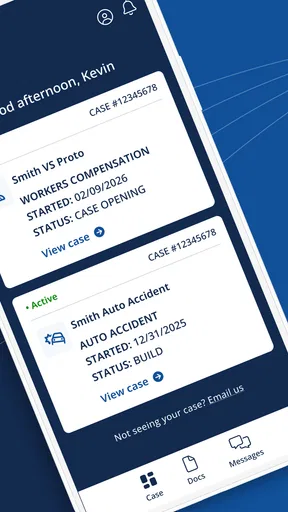
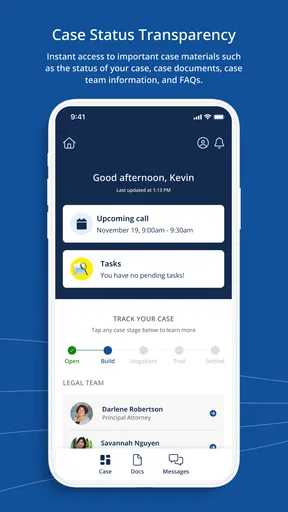
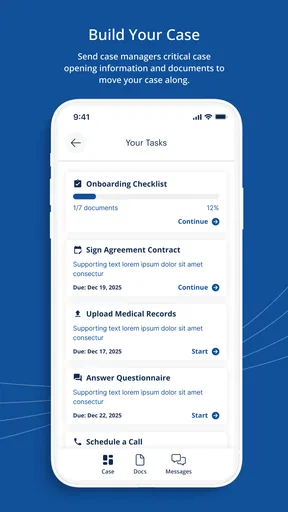
The most important capability here is mobile case-status access. That sounds modest, but it addresses a very specific part of the client experience. Legal matters often move in stages, and a client may not know whether a quiet period means that nothing has changed, that work is continuing behind the scenes, or that an action is needed. Having a dedicated mobile route to the case can reduce some of that uncertainty.
In my view, the value is not that the app makes a legal process fast. It cannot change the pace of a case, decide its outcome, or replace communication with the legal team. Its value is that it gives the client a convenient checkpoint. Instead of relying only on memory, scattered messages, or a desktop browser, the client can open the app when it is practical and look for the latest available status.
That distinction matters. I would not install this expecting legal advice, document interpretation, or a complete explanation of every procedural step. I would install it if I were already connected with Morgan & Morgan and wanted a simpler way to stay oriented. The app works best as a client-facing window into an existing relationship, not as a standalone tool for someone who has never contacted the firm.
What the focused design changes for everyday use
A general web search can answer broad questions about lawsuits, but it cannot tell me where my own matter stands. A normal email inbox may contain useful messages, yet it is easy to lose the thread among unrelated conversations. A phone call can be more personal, but it may be inconvenient when I only need a quick status check. Morgan & Morgan Mobile occupies the space between those options.
The practical advantage is reduced friction. If I am commuting, taking a break at work, or sitting at home after remembering my case late in the evening, a mobile status check is more natural than opening a laptop or searching through old correspondence. That convenience is especially helpful for people who do not want to contact a legal office every time they need reassurance that their matter is still moving through the process.
Worth Reading Before You Choose

EA SPORTS FC Mobile 26 Is a Bigger Football Game, but It Takes Time

Flipboard Shows What News Apps Must Do Beyond the Feed

Switching to Android Auto Means Rethinking Your Driving Routine

Google Calendar Makes a Crowded Week Easier to Manage

Ludo King Makes the Most of the Minutes Between Plans

Baby Panda World Brings Quick Play to Modern Phones, but Its Game Library Feels Busy
There is also a psychological benefit. A case can occupy a lot of mental space even when no action is required from the client. A quick look at the current status can help separate “I need to do something” from “I am waiting for the next stage.” I would treat that as the app’s real strength: not legal analysis, but a clearer routine for staying informed.
How I would use it in practice
The sensible workflow begins with the case rather than the app itself. I would install Morgan & Morgan Mobile only after becoming a client or receiving the information needed to connect it with my matter. Once access is established, I would use it as a regular checkpoint instead of repeatedly opening it throughout the day. Legal updates are not usually improved by constant refreshing, and a calm schedule is more useful than anxious monitoring.
A good routine might be to check the app after receiving a notification or before contacting the firm with a question. If the status already answers the immediate concern, I can avoid an unnecessary call. If it does not, I have a clearer starting point when I reach out. This is one of the less obvious ways to get value from the app: use it to make conversations more focused, not to eliminate conversations altogether.
I would also keep my expectations realistic about what a status label can communicate. A short update may confirm a stage without explaining every reason behind it. If I saw a change that I did not understand, I would note the wording and ask the appropriate legal contact rather than trying to interpret it from online sources. That habit prevents a convenient status screen from becoming a source of accidental self-advice.
A realistic day with the app
Imagine that I submitted information for a case and then spent several days dealing with work and family responsibilities. I remember the matter during a lunch break and want to know whether there is a new development. With the app available, I can check the case status at that moment instead of waiting until I get home, searching old emails, or calling while the office is busy.
If the status is unchanged, I have a quick answer and can return to my day. If it has moved forward, I can pay closer attention to any next communication and prepare questions while the information is fresh. If the screen does not resolve my concern, I can contact the firm with a specific question about the displayed stage. That is more efficient than beginning with a vague request for “an update” because I have already checked the client-facing information.
This scenario also shows the app’s limits. A status check does not necessarily tell me what a legal development means for my personal situation. It may not replace a conversation when timing, documents, or decisions are involved. The app helps me decide whether a conversation is needed; it should not persuade me that every conversation is unnecessary.
Using the status view as a personal record
One practical tip is to treat each check as a prompt for organized note-taking. If something changes, I would record the date I noticed it, the exact wording I saw, and any question it raised. I would not rely on memory, especially if the case has several stages or if other family members are involved. This turns a simple status screen into a more useful preparation tool for future communication.
I would also avoid sharing access casually. A case can involve sensitive personal circumstances, so a client should be thoughtful about using the app on a shared device or leaving the screen visible. That is not a criticism unique to this product; it is simply a sensible habit whenever a mobile app displays private legal information. The convenience of checking a case anywhere should be balanced with awareness of who can see the device.
Where the app is strong and where it creates friction
The strongest part of Morgan & Morgan Mobile is its clarity of purpose. I do not have to sort through a broad collection of unrelated business tools to reach the reason I opened it. For an existing client, that focus can make the app feel more useful than a generic browser bookmark, particularly when the phone is already the main device used for daily tasks.
The free price also lowers the barrier to trying it. I would not need to decide whether occasional status access justifies another subscription. That makes sense for a legal client tool, because the app’s usefulness depends on whether a person has an active relationship with the developer’s firm, not on how often that person wants to use an app for entertainment or productivity.
At the same time, the focused design means there is less reason for people outside the firm’s client base to keep it installed. If I were researching whether to hire Morgan & Morgan, I would not expect this app alone to help me compare attorneys, understand legal rights, or evaluate a claim. A firm website, an initial consultation, or independent legal advice would be more appropriate for those decisions.
Another trade-off is the difference between visibility and explanation. Seeing that a case has a current status is useful, but a status is not the same as a detailed timeline. If I prefer long-form notes, attachments, or a complete history of every interaction, I would still want to keep my own records and communicate directly with the firm. The app should be viewed as a convenient access point, not necessarily the only place where I manage the matter.
How it compares with the usual alternatives
The closest alternative is usually a mobile browser pointed at a firm website or client portal. A browser can be more flexible and may be better when I need to read broader information, but it also introduces extra steps: opening the browser, finding the right page, signing in if necessary, and navigating to the relevant section. A dedicated app makes sense when the main task is repeated and narrow, such as checking a case status.
Email has a different advantage. It creates a written conversation and may be better when I need to explain a complicated question or send information. However, email is not always a clean status dashboard. Messages can be buried, forwarded, or separated from the latest development. I see Morgan & Morgan Mobile as complementary to email rather than a full replacement for it.
Phone contact remains the better option when the situation is urgent, confusing, or dependent on personal advice. A call allows a client to explain context and ask follow-up questions immediately. The app is better for a quick, low-effort check; a phone conversation is better when the answer needs interpretation. Knowing which tool to use is more important than expecting one tool to handle everything.
Who gets the most value from it
I think the app is most useful for current Morgan & Morgan clients who want a simple way to stay aware of their case between conversations. It should also suit people who manage most tasks from a phone, dislike searching through email, or find it difficult to call during ordinary office hours. Family members helping someone keep track of a matter may appreciate the same convenience, provided access is handled appropriately.
It is less suitable for someone who wants a general legal education app, a way to compare firms, or a complete case-management workspace for unrelated legal matters. It is also not the right tool for a person who needs immediate legal guidance. In those situations, a direct conversation with a qualified legal professional is more appropriate than relying on a status display.
Before installing, I would ask myself one practical question: am I looking for access to an existing Morgan & Morgan case, or am I still deciding what legal help I need? If the answer is the first, the app’s focused design is a genuine advantage. If the answer is the second, it may not give me much useful information until I have an established client connection.
Compatibility and the overall experience
The app was released on May 5, 2022, and its current version is 4.31.1. It supports devices running Android 7.0 or later, which covers a broad range of Android phones. I would still keep the app updated when updates are available, especially for a tool connected to a personal case, because reliability matters more here than novelty.
The public response is notably positive, with a 4.9 average from about 4.7 thousand ratings and around 426 written reviews. I treat that as encouraging rather than conclusive. A high rating indicates that many users like the experience, but individual usefulness still depends on whether the person has a case with Morgan & Morgan and whether the information shown answers the question they actually have.
My final assessment is straightforward: this is a focused client-access app, not a substitute for legal communication. I would recommend it to an existing Morgan & Morgan client who wants a convenient status check and a better routine for deciding when to follow up. I would skip it if I were searching for broad legal resources or immediate advice. Used for its intended purpose, its restraint is its main benefit: it gives the case-status question a dedicated place on the phone without pretending to solve the entire legal process.
For that audience, Morgan & Morgan Mobile earns its place as a practical companion. The developer, Morgan & Morgan PLLC, keeps the idea centered on access rather than distraction, and the free model makes trying it easy. I would use it alongside direct contact and personal notes, not instead of them. That balance is what makes the app genuinely helpful in everyday life.
Pros
- Free access to legal information and case-related resources
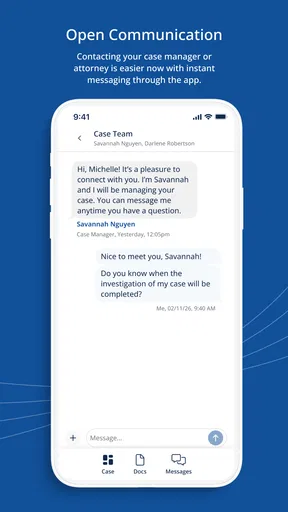
- Convenient way to contact the firm from a mobile device
- Helpful tools for checking potential case eligibility
- Simple interface makes key services easy to find
- Useful updates can keep users informed about their claim
Cons
- Availability and features may vary by state or case type
- Not a substitute for personalized advice from an attorney
- Some users may receive marketing or case-related notifications
- Case information may require account creation and verification
- App usefulness is limited for people outside the firm’s service areas
FAQs for Morgan & Morgan Mobile
What is Morgan & Morgan Mobile used for?
Morgan & Morgan Mobile is designed to help clients and potential clients connect with the Morgan & Morgan law firm. Depending on the available features, users may be able to request a case evaluation, submit contact information, communicate with the firm, review updates, and access general legal resources. It is primarily a legal-service companion rather than a tool that replaces personalized advice from a qualified attorney.
Can I use the app to determine whether I have a legal case?
The app may provide an initial way to share information about an accident, injury, or other legal matter for review by the firm. However, submitting details does not guarantee representation or mean that an attorney-client relationship has been created. Case eligibility depends on many factors, including evidence, deadlines, location, and applicable law, so users should avoid relying on the app alone for urgent legal decisions.
Is my personal information secure when I use Morgan & Morgan Mobile?
Because a legal inquiry can involve sensitive details, users should review the app’s privacy policy and requested permissions before submitting information. Use a secure internet connection, keep the application updated, and avoid entering confidential data on a shared device. Although the firm may use security measures to protect submitted information, no online service can promise absolute security, and privacy terms may change over time.
Does Morgan & Morgan Mobile cost anything to download or use?
The application may be available as a free download, but using it does not necessarily mean that every legal service is free. Legal fees, contingency arrangements, case expenses, and eligibility requirements can vary depending on the matter and the agreement with the firm. Before proceeding, users should read any fee information carefully and ask the firm to explain potential costs and obligations.
Is Morgan & Morgan Mobile available for everyone, and what should I do if it does not work?
Availability and functionality can depend on your country or state, device, operating-system version, and the firm’s current service coverage. Some features may require an account, internet access, or additional verification. If the app crashes, will not install, or fails to submit a request, check for updates, restart the device, and contact official Morgan & Morgan support through a verified website or app-store listing.


